- How to Recharge A Salik Account in Dubai
- How to Salik Recharge in Dubai via Helpline Number?
- How to Recharge Salik Account in Dubai by SMS?
- How to Recharge Salik in Dubai Via Self-Service Machine or Kiosks?
- How to Recharge Salik Online in Dubai?
- How to Salik Recharge in Dubai via Smart Salik App?
- How to Recharge Salik in Dubai via Bank?
- Things to Consider When Using a Salik Account in Dubai
- FAQ's
- Guide of Car Insurance Dubai
Methods of Salik Recharge in Dubai
The UAE is known worldwide for having one of the world’s best road transport systems, and for good reason. The Road and Transport Authority (RTA) of Dubai has demonstrated its distinguished status by implementing several exceptional initiatives to ensure safety, adherence to laws, as well as congestion-free movement on its high-speed roads. One such initiative is the Salik system.read more


Get 12 Free Car Washes
Search Your Car's brand


Nissan

Toyota

Honda

Mitsubishi

Ford

Hyundai
4.7/5
43,419
 Reviews
Central Bank UAE Registration No.: - 123
35+
Insurance Partners
2 Million+
Trusted Customers
1 Million+
Policies Sold
Table of Content
How to Recharge A Salik Account in Dubai
Before you recharge, make sure you check your Salik balance. If it is low then recharge it as early as possible. You can make payment using the Salik card or credit card. Some Salik top-up methods are discussed further in the article.
Having understood how to check your Salik balance, let's understand some ways to recharge your Salik Account in Dubai —
- Helpline Number
- SMS
- Self-Service Machine or Kiosks
- Salik Recharge Online (Salik Official Website, Salik Recharge Card)
- Smart Salik App (Salik Recharge Card Number, Credit Card)
- Banks (SMS, ATM, mobile banking, cash deposit machine, and IVR)
How to Salik Recharge in Dubai via Helpline Number?
To recharge your Salik account, dial the customer service number — 800-SALIK (72545) — and add your balance using the Salik recharge card. Once you have the card, scratch it and follow these instructions —
- Dial the mentioned helpline number.
- Select the preferred language.
- Enter the 12-digit recharge number present on the back of the card.
Once the top-up is successful, you will receive an SMS alert confirming the same on your registered mobile number.
How to Recharge Salik Account in Dubai by SMS?
This is one of the easiest methods to recharge your Salik account. After getting a recharge card, do this —
- Scratch the card to know your 12-digit Salik recharge number.
- Draft a message in this format — R <Space> 12-digit number <Space> Salik account number <Space> Salik PIN.
- Send the text to 72545.
Once you send the message using your registered mobile number, you will receive a confirmation message about successful Salik recharge.
How to Recharge Salik in Dubai Via Self-Service Machine or Kiosks?
In Dubai, you can find Salik self-service machines or kiosks across 6 different areas —
- Deira
- Al Aweer
- Al Towar
- Al Barsha
- Al Kifaf
- Umm Ramool
Here's you can recharge your Salik account using the kiosks —
- Log in using your registered email address and password.
- Click on the Recharge tab.
- Add the balance to your account via cash.
- Your Salik account will get credited with the amount.
How to Recharge Salik Online in Dubai?
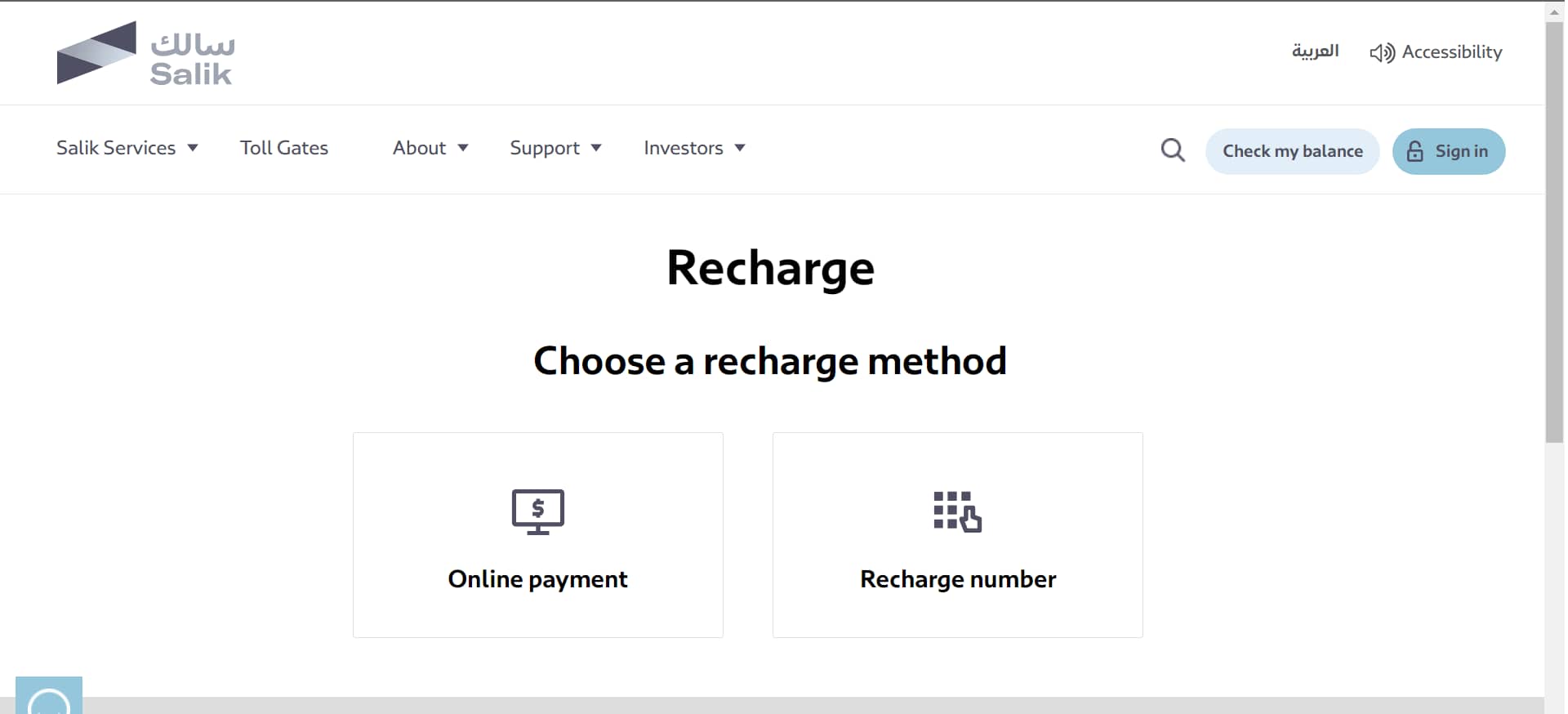
This is a pretty convenient way to recharge your account from anywhere and at any time. To recharge Salik online on the official website, follow these steps-
- Step1- Log into Salik’s official website.
- Step2-Select Salik Services My Tag-Recharge.
- Step3-Select the recharge method as Online.
- Step4-Enter your account details including registered mobile number, Emirate, country, category, and plate number and code.
- Step5-Select the recharge amount and click on the Next button.
- Step6-Provide your credit card number in the specified field along with other payment details.
You will be navigated to the acknowledgement page if your Salik recharge online is successfully done. If you want to make a payment using the Salik recharge card, follow these steps —
- Step1- Select Salik Service at My Tag-Recharge option.
- Step2-Select the recharge method as Recharge Number.
- Step3-Provide your account details registered mobile number, Emirate, country, category, and plate number and code.
- Step4-Enter the 12-digit recharge number present on the back of the card.
- Step5-Hit the Recharge tab.
If the top-up is successful, you will be directed to the acknowledgement page.
How to Salik Recharge in Dubai via Smart Salik App?
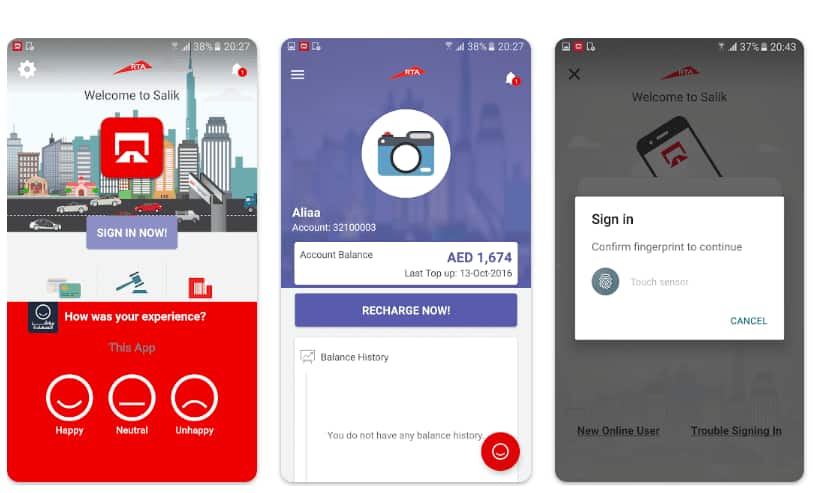
This is an efficient mobile app that helps you tackle all the Salik account-related tasks easily. If you plan to use the mobile application for Salik recharge, here are the steps to follow —
Using Salik Recharge Card Number
- Step1- Download the Smart Salik App.
- Step2-Sign up using the account number and PIN provided to you.
- Step3-If you already have the app, simply log into the mobile account.
- Step4-Head to the Recharge tab and select Recharge Number as the payment method.
- Step5-Provide the 12-digit recharge card number or scan the number using the camera icon present on the page.
If the Salik recharge is successful, you will receive a confirmation alert with your updated balance.
Using Credit Card
- Step1- Log into the mobile application and tap on the Recharge tab.
- Step2-Choose the payment method as Online Payment.
- Step3-Enter the recharge amount — make sure it is in the multiples of 50.
- Step4-You will be then directed to the payment gateway.
- Step5-Enter the credit card details and hit the Done tab.
- Step6-You will be directed to the confirmation screen upon successful Salik recharge.

How to Recharge Salik in Dubai via Bank?
Most banks in Dubai also offer Salik recharge services. If you are a customer of any such banks, you can recharge your Salik account using channels like SMS, ATM, mobile banking, cash deposit machine, and IVR.
Several banks have also installed self-service machines. You can find them at some of the branches of Dubai Islamic Bank, Abu Dhabi Islamic Bank, and First Abu Dhabi Bank.
Here's a list of banks that offer Salik recharge in Dubai along with their active recharge channels —
| Banks | Website | IVR | ATM | Mobile | CDM | SMS |
|---|---|---|---|---|---|---|
| Emirates NBD | ✔ | ✔ | ✔ | ✔ | ✔ | ✔ |
| Abu Dhabi Commercial Bank | ✔ | ✔ | ✔ | |||
| Citibank | ✔ | ✔ | ✔ | |||
| Mashreq Bank | ✔ | |||||
| Sharjah Islamic Bank | ✔ | ✔ | ✔ | |||
| Abu Dhabi Islamic Bank | ✔ | ✔ | ✔ | ✔ | ||
| Ajman Bank | ✔ | ✔ | ✔ | ✔ | ||
| Noor Bank | ✔ | |||||
| Dubai Islamic Bank | ✔ | ✔ | ✔ | ✔ | ✔ | ✔ |
| Commercial Bank of Dubai | ✔ | ✔ | ✔ | |||
| First Abu Dhabi Bank | ✔ | ✔ | ✔ | ✔ | ||
| RAKBANK | ✔ | ✔ | ✔ | ✔ | ||
| Standard Chartered Bank | ✔ | |||||
| Al Hilal Bank | ✔ | ✔ | ✔ | ✔ | ||
| United Arab Bank | ✔ | ✔ | ||||
| National Bank of Umm Al Quwain | ✔ |
Note — As banks may activate or deactivate services, check with your respective bank(s) which services are available at the branches in real-time.

Things to Consider When Using a Salik Account in Dubai
Here are some important things you should keep in mind when using a Salik account in Dubai —
- Check your Salik account before you pass a Salik toll gate. If you cross the gate with insufficient funds, you will be fined AED 50.
- If you don't recharge your Salik account within 5 working days (from the travel date) of the last check, you will be fined another AED 50.
- The Salik recharge amount should be in the multiple of 50. The minimum recharge amount is AED 50, while the maximum cap is AED 50,000.
FAQ's
Besides the methods mentioned above, are there any other ways to recharge your Salik account?
You can also recharge your Salik account through the Dubai Now Smart Application, RTA Dubai Drive Application, and RTA Dubai app.
Where can you buy a Salik recharge card in Dubai?
You can buy a Salik recharge card at any fuel station in Dubai.
Can you set up an auto-Salik recharge?
Yes, several banks in Dubai offer auto-recharge for your Salik account.
Can you recharge the Salik account for someone else?
Yes, you can recharge another person’s Salik account. For this, you must have their Salik account number and PIN, mobile number, vehicle plate number, and Salik tag number.

Veli kaplanAbu Dhabi, 27 May 2026
★★★★★
Quite Affordable Car Insurance in the UAEPolicybazaar.ae was the place where I found the cheapest car insurance in UAE, but without any compromise on what I wanted in coverage. Got a solid comprehensive plan and the difference this time was I thoroughly informed by the team, so chose only the necessary add-ons and saved on costs.
Shyla beeviDubai, 23 May 2026
★★★★★
Hands Down the Best Place for Motor Insurance in the UAEI'd heard of PB.ae from a colleague and decided to try out for car insurance this time. Turns out, this was the best decision with how easy the whole journey was. Never did I ever expect to find the best policies with this much clarity, and that too with detailed explanations. Best site, delivered a 10/10 experience.
Laura Anne HaigDubai, 11 May 2026
★★★★★
Sound Advice on Car InsuranceCredits to Policybazaar.ae for getting me the best car insurance in UAE. The website was great as I could see the top plans, prices and whatnot, but the team was outstanding too. They took time and understood my requirements without rush. This zero pressure thing worked with me, like I actually made an informed choice!
Salma ElgerbyDubai, 5 May 2026
★★★★★
Helpful Experts and Clear Car Insurance OptionsPB people made it easier for me to understand car insurance plans in Dubai. The experts explained the important points in simple language and helped me compare the available options. I could check the premium, coverage and benefits before deciding. The experience was good and I did not feel pushed into buying something I did not need. So YESSSSSS!!!
YasirDubai, 28 April 2026
★★★★★
Expert Advice Made Car Insurance EasierI was not sure which car insurance in the UAE would be right for me. The expert advice from Policybazaar.ae really helped. Instead of just looking at the premium, I understood what coverage I should check, what add-ons may be useful and what things I should avoid. It made me feel more confident before buying the insrance.
Lino JohnDubai, 19 April 2026
★★★★★
Good Platform for Comprehensive Insurance in DubaiI wanted comprehensive car insurance in Dubai and was not sure which plan would offer the right coverage. Policybazaar.ae showed multiple options from different insurers, which helped me compare prices and benefits easily. I liked that I could see important details like coverage, add-ons and claim support before making a decision. It felt more transparent than choosing a plan blindly.
More From Car Insurance
- Recent Articles
- Popular Articles
 Last Updated : 05 Aug 2026Car Insurance with Tabby in the UAE | Interest-Free PaymentsBuy car insurance with Tabby in the UAE and split your premium into 4 interest-free instalments with no processing fees and no minimum premium requirement.
 Last Updated : 04 Aug 2026 Import JDM & Right-Hand-Drive Classic Cars to UAEPlanning to import a JDM or right-hand-drive classic car to the UAE? Explore 2026 import regulations, RTA inspections, import costs, & insurance requirements..
 Last Updated : 03 Aug 2026Driving to Oman or Saudi Arabia: Which Car Insurance and Border Documents Do You Really Need?Planning to drive from the UAE to Oman or Saudi Arabia? know which car insurance, border permits, and essential documents you need for a smooth cross-border journey.
 Last Updated : 28 Jul 2026Orphaned Chinese Car Brands in the UAE: Insurance and Spare Parts AvailabilityUnderstand what an orphaned car brand is, why some Chinese car brands have exited the UAE market, and how it can affect insurance, repairs, spare parts, and long-term ownership.
 Last Updated : 28 Jul 2026Smart Summon & Autonomous Parking Accidents in the UAE: Liability ExplainedFind out how liability is determined when a Smart Summon or autonomous parking feature causes an accident in the UAE, and what it means for your car insurance claim.
 Last Updated : 27 Jul 2026EV Water Damage Insurance in UAE | Flood & Water Ingress Claims GuideKnow how UAE car insurance covers EV water ingress claims after heavy rain. Find out if electric vehicle battery, motor, and flood damage are covered, how to file a claim, and when an EV may be declared a total loss.
 Last Updated : 04 Jun 2026How to Check Car Insurance Status Online in UAE - 2026Check Car Insurance Status Online - Checking your vehicle insurance status online in UAE with these methods RTA Website , EVG , MoI ,Policybazaar.ae & more.
- Last Updated : 31 Jul 202610 Best Car Insurance Companies in Dubai, UAE - 2026Checkout the list of top 10 best car insurance companies in Dubai, UAE with their products & service benefits that they offer so you can choose best as per your needs.
 Last Updated : 24 Mar 2026How to Transfer Vehicle Ownership in UAE - Process, Documents, FeesTransfer Car Ownership in UAE - Checkout Step by step guidance to transfer your car registration & ownership when you are selling or buy used cars in UAE
 Last Updated : 21 Jul 2026Abu Dhabi Traffic Fines 2026 - Complete List, Payment & MoreGet the updated list of Abu Dhabi traffic fines for 2026, including speeding fines, number plate violations, reckless driving penalties, and more. how to check and pay Abu Dhabi Police traffic fines online.
.jpg) Last Updated : 15 Jun 2026Abu Dhabi Parking SMS - Format, Codes, Types, Charges, How to PayGet the Comprehensive Guidance for SMS Parking in Abu Dhabi. Also know how to Pay for MAWAQIF Parking, Parking types and charges, Code List, Benefits, Extensions, & more about Abu Dhabi Parking SMS.
Last Updated : 15 Jun 2026Abu Dhabi Parking SMS - Format, Codes, Types, Charges, How to PayGet the Comprehensive Guidance for SMS Parking in Abu Dhabi. Also know how to Pay for MAWAQIF Parking, Parking types and charges, Code List, Benefits, Extensions, & more about Abu Dhabi Parking SMS. Last Updated : 01 May 2026How to Check Black Points on License in Dubai | Black Points DubaiBlack Points Dubai - Know black points system in Dubai & Also know how to check & reduce black points in Dubai, penalty, rule & regulation & more.
Disclaimer▼




 Google Reviews