How to Easily Plan a Journey with the Wojhati App?
Buy Car Insurance in 30 Seconds !




4.7/5
43,419
 Reviews
Central Bank UAE Registration No.: - 123
Insurance Partners
Trusted Customers
Policies Sold
.webp)


Best Car Insurance in UAE
Some of the best and the cheapest car insurance quotes in Dubai are:





Continue reading to find out all the attractive features of the Wojhati app and how to use it.
Ways to Use Wojhati to Plan Your Journey
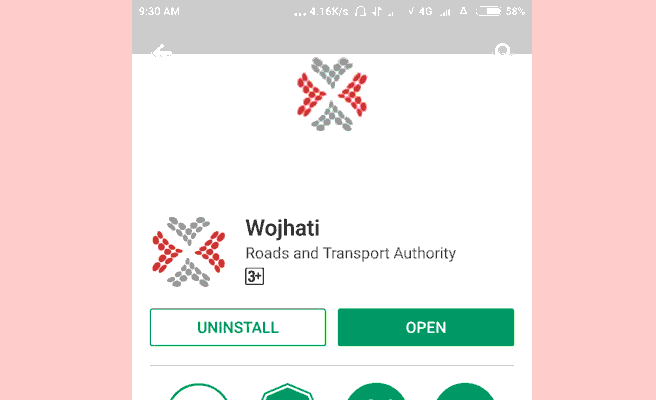
Step 1: Download and install the Wojhati App
To get started with your travel journey, download the Wojhati App from the Google Play Store or the Apple App Store as per your device.
Step 2: Tap on the Wojhati Icon
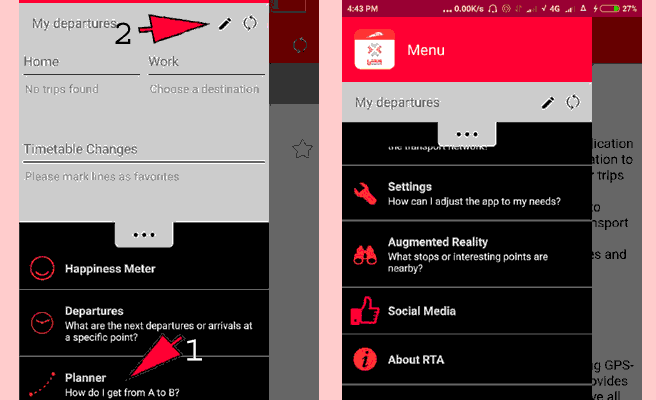
Click on the Wojhati icon in the menu bar and head over to the upper left corner. You can then tap on the upper left corner where 3 parallel lines are seen.
The following options will be visible on the menu here:
Happiness Meter: This will allow you to view the feedback from the users of the app.
Departures
You can use this option to check out the closest departure or arrival place, available in the form of a list or a map. To access maps, tap on the three dots and select a map. Here, you can also choose from a larger number of saved locations.
Planner
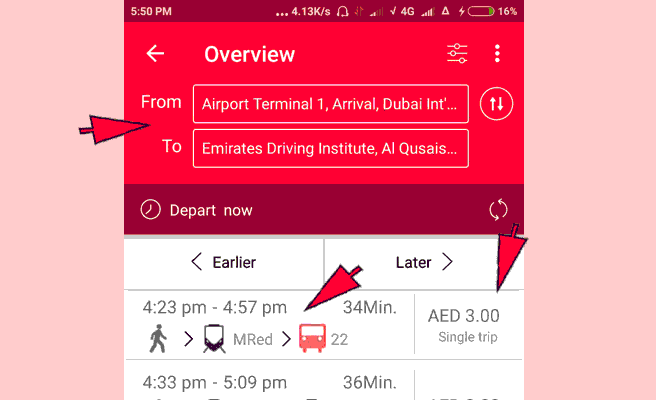
This option can be used to plan your journey between two locations. This is also where the fares will be displayed (located on the right side). By hovering your finger over the bus route, you will be able to view the map easily, with your trip route being displayed in violet. After tapping on the upper right corner dot menu, you can also see the first and last trips on that route.
Three Dot Menus
This menu, located in the upper right corner of the screen, allows users to start a new journey and save the route to their calendar. Notably, you can also view the share option in the lower right-hand corner, which will allow you to share the route.
Transport Updates
For checking the real-time situation regarding your transport, you can select this option and know if your chosen mode of transport is running late. This option also allows you to see if the route needs to be changed.
Settings
You can do the following actions under this category:
- You can set the accuracy to best or less perfect to adjust with the battery life
- You can choose between departures, planners, augmented reality, or the last screen you used as the opening screen
- Both the maximum walk time and walking pace can be adjusted
- You can set the path in the travel settings
- You can have the options categorised on the basis of the number of required interchanges and the quickest route
- You have the option of using a bus, a water bus, the metro, a tram, or a taxi for your journey
- To delete previously used points and trips, utilise the Clear History option here. Regarding the history, you can also enable or disable the map-cache.
Step 3: Choose Your Preferred Location
In the menu, you can choose ‘planning’ and add two locations as your home and office. To edit them, go to the main menu and select the pencil icon.
Step 4: Enter your Starting and Ending Points
Step 5: Vehicle Information
Once you complete the mentioned steps and enter the required details, a list of buses and routes will be displayed. You can view them on the map by tapping on them as well as share your route with anyone using the map.
Advantages of a Journey Planning Tool Like Wojhati
While planning the trip and enjoying the destination is pleasurable, the aspect of asking people for directions can often prove tiring and tedious. However, we now have a solution for even that in our pockets due to smartphones and mobile applications like Google Maps, the Wojhati app, etc. With more than 54% of adults between the ages of 18 and 29 years utilising their smartphones to navigate worldwide as per reports, mapping and route planning with smartphones are increasingly becoming a regular practise.
While there is already a plethora of route planning and navigation apps available in the UAE, the Dubai-based Wojhati RTA is among the best ones. Besides providing guidance regarding the route, this app also allows users to estimate other aspects like the journey fare, expected duration, and so on.
Listed below are some more benefits of journey planning tools like Wojhati:
- Helps identify cost-effective routes: Besides excellent route planning, Wojhati RTA allows users to identify the routes that will prove cost-efficient regarding their journey. This allows individuals to properly spend on the entertainment and leisure activities instead of spending more on the journey.
- Reduced Miles: By providing optimal routes, this application reduces the number of miles driven. You can cut down on the miles driven by avoiding being lost and taking the wrong route. Moreover, as this app ensures fewer kilometres on the road, it saves money in the following ways:
- Reduced fuel expenditures: Fewer miles on the road mean less gasoline use and lower total costs
- Reduced car maintenance costs: Driving fewer kilometres can significantly reduce the need for vehicle maintenance. With this aspect, you can utilise your vehicles for a greater number of journeys with better efficiency
- Accident reduction: Less time on the road and the choice of the best routes mean less time in heavy traffic and less probability of being involved in accidents.
- Planning time reduced: With the advanced route mapping solutions provided by the app reducing the complexity of routes and traffic for users, you can significantly reduce your planning time for your trips.
It should be noted that this app can also prove beneficial for businesses, as they can gauge the efficiency of their deployed drivers and make decisions to solve the issue. Similarly, the app can be used to enhance the efficiency and profitability of fleets by businesses. This can often result in faster and more efficient deliveries.
Frequently Asked Questions
Q1. Why are trip planning tools essential for a trip?
Ans: As the process of planning a trip can prove difficult due to the involvement of several variables like destinations, routes, mode of transport, etc., a journey planning tool like Wojhati becomes essential for a trip by helping you build your itinerary using accurate information.
Q2: Do I need technical knowledge to use a Wojhati journey planning tool?
Ans: No, you do not need to have any technical knowledge to use the Wojhati journey planning tool. . An Internet connection and a general idea of what you wish to explore is all you need to use this app.
Q3: How do Wojhati's journey planning tools work?
Ans: Wojhati is a journey planning tool that helps users plan their trips by analysing the user’s travel preferences, location, and travel history. These preferences are utilised to create personalised itineraries and find the most effective route regarding costs, journey time, ease of driving, and so on. Further features provided by the RTA Wojhatiapp include trip alerts, weather forecasts, real-time traffic updates, audio guides, maps, and so on.
Q4: What are the benefits of using a Wojhati journey planning tool?
Ans: The Wojhati journey planning tool allows users to plan their trips based on various factors with a few taps on their smartphones at their convenience. Instead of asking for directions numerous times, or getting lost or stuck in traffic, you can know all about the traffic conditions and the routes to plan your journey in an informed way.
Q5: Can I use the Wojhati journey planning tool from my mobile device?
Ans: Yes, you can use the Wojhati journey planning tool on your mobile device. The Wojhati journey planner is available on both iOS and Android devices. You can download the app for free from the Apple App Store or the Google Play Store.
Q6: How long does it normally take for someone to plan a journey using a tool like this?
Ans: Instead of being just a map with directions, Wojhati RTA combines the aspects of the map with an itinerary planner that helps you plan your trip. Consequently, users can make decisions based on traffic, route, cost, duration of the journey, and so on in a few minutes to plan their journey using this tool.

More From Car Insurance
- Recent Articles
- Popular Articles
 Last Updated : 07 Aug 2026 Agreed Value vs Market Value Insurance for Classic Cars in UAE (2026)Understand the difference between agreed value and market value insurance for classic cars in the UAE. Compare coverage, claim settlements, premiums, and valuation methods.
 Last Updated : 05 Aug 2026Car Insurance with Tabby in the UAE | Interest-Free PaymentsBuy car insurance with Tabby in the UAE and split your premium into 4 interest-free instalments with no processing fees and no minimum premium requirement.
 Last Updated : 07 Aug 2026 Import JDM & Right-Hand-Drive Classic Cars to UAEPlanning to import a JDM or right-hand-drive classic car to the UAE? Explore 2026 import regulations, RTA inspections, import costs, & insurance requirements..
 Last Updated : 03 Aug 2026Driving to Oman or Saudi Arabia: Which Car Insurance and Border Documents Do You Really Need?Planning to drive from the UAE to Oman or Saudi Arabia? know which car insurance, border permits, and essential documents you need for a smooth cross-border journey.
 Last Updated : 28 Jul 2026Orphaned Chinese Car Brands in the UAE: Insurance and Spare Parts AvailabilityUnderstand what an orphaned car brand is, why some Chinese car brands have exited the UAE market, and how it can affect insurance, repairs, spare parts, and long-term ownership.
 Last Updated : 28 Jul 2026Smart Summon & Autonomous Parking Accidents in the UAE: Liability ExplainedFind out how liability is determined when a Smart Summon or autonomous parking feature causes an accident in the UAE, and what it means for your car insurance claim.
 Last Updated : 04 Jun 2026How to Check Car Insurance Status Online in UAE - 2026Check Car Insurance Status Online - Checking your vehicle insurance status online in UAE with these methods RTA Website , EVG , MoI ,Policybazaar.ae & more.
- Last Updated : 31 Jul 202610 Best Car Insurance Companies in Dubai, UAE - 2026Checkout the list of top 10 best car insurance companies in Dubai, UAE with their products & service benefits that they offer so you can choose best as per your needs.
 Last Updated : 24 Mar 2026How to Transfer Vehicle Ownership in UAE - Process, Documents, FeesTransfer Car Ownership in UAE - Checkout Step by step guidance to transfer your car registration & ownership when you are selling or buy used cars in UAE
 Last Updated : 21 Jul 2026Abu Dhabi Traffic Fines 2026 - Complete List, Payment & MoreGet the updated list of Abu Dhabi traffic fines for 2026, including speeding fines, number plate violations, reckless driving penalties, and more. how to check and pay Abu Dhabi Police traffic fines online.
.jpg) Last Updated : 15 Jun 2026Abu Dhabi Parking SMS - Format, Codes, Types, Charges, How to PayGet the Comprehensive Guidance for SMS Parking in Abu Dhabi. Also know how to Pay for MAWAQIF Parking, Parking types and charges, Code List, Benefits, Extensions, & more about Abu Dhabi Parking SMS.
Last Updated : 15 Jun 2026Abu Dhabi Parking SMS - Format, Codes, Types, Charges, How to PayGet the Comprehensive Guidance for SMS Parking in Abu Dhabi. Also know how to Pay for MAWAQIF Parking, Parking types and charges, Code List, Benefits, Extensions, & more about Abu Dhabi Parking SMS. Last Updated : 01 May 2026How to Check Black Points on License in Dubai | Black Points DubaiBlack Points Dubai - Know black points system in Dubai & Also know how to check & reduce black points in Dubai, penalty, rule & regulation & more.




 Google Reviews